
Paid product options for Squarespace.
Add engraving, gift wrap, custom text and more to your Squarespace products. Each option can have a price. Customers choose what they want and pay in your own Squarespace cart and checkout.
$12 a month per store, or $120 a year. Building and testing on your squarespace.com address is free. Pricing
Try it: built from the Engraving template. Check, type and pick, and the price follows.
Live preview is coming soon: customers will see their words on your product photo, in the font they pick. Notify me at launch
Seven kinds of option, priced or free.
Mix them on one product. Show some only when another is chosen. Require an answer where you need one.
Text field
“Name to engrave: EMMA.” One line to type: free, a fixed price, or per letter with the first few free.
Text box
“Gift message: Happy birthday, Mom!” A longer box for a message or special instructions, with a character limit.
Checkbox
“Add laser engraving, +$15.” A checkbox, charged per item or once per order, for rush and setup fees.
Dropdown or swatches
“Frame: Oak, Walnut, Black.” A dropdown, a list, buttons or color swatches, each choice with its own price.
Quantity
“Extra candles, $0.75 each.” A number to enter, priced each, with a minimum and a maximum.
File upload
“Upload your photo.” A photo, logo or design file sent with the order, in the file types you choose.
Info text
“Made to order: ships in 2 weeks.” A line of text between options, to explain them or group them.
Rules and settings
Shows when
“Engraving text” appears only when “Add laser engraving” is checked. “Museum glass” only when a frame is chosen. Rules on any option.
Required, help text, limits
Mark options required, add a short line of help under any of them, and set limits so you never get a 90-letter engraving.
Choose products
Show a group of options on all products, on products with a tag or in a category, or on products you pick.
Your store’s look
Options use your theme’s fonts and colors, on light or dark sites, on phones and computers.
How paid options work
Squarespace can only charge for products. So each option with a price is a product in your store, on a page that isn’t in your menu: “Laser engraving, $15”. When a customer adds a cutting board with engraving, OptionKit adds the engraving product in the same click, at the right quantity.
Squarespace does the rest: the cart, discount codes, taxes, checkout, the order and the email. The total on the product page includes the item and its paid options. Squarespace adds shipping, taxes and discounts at checkout.
On the order, each item’s details go on a $0 Personalization line with a short code, like Item: MANGO-42. It lists the paid options the item was charged for, so two boards with two names stay two clear jobs.

- The board, at its own price.
- What the customer chose, one line each. Change opens them again.
- Each paid option on its own line, so Squarespace charges it.
How it works
About half an hour from opening the builder to your first live option.
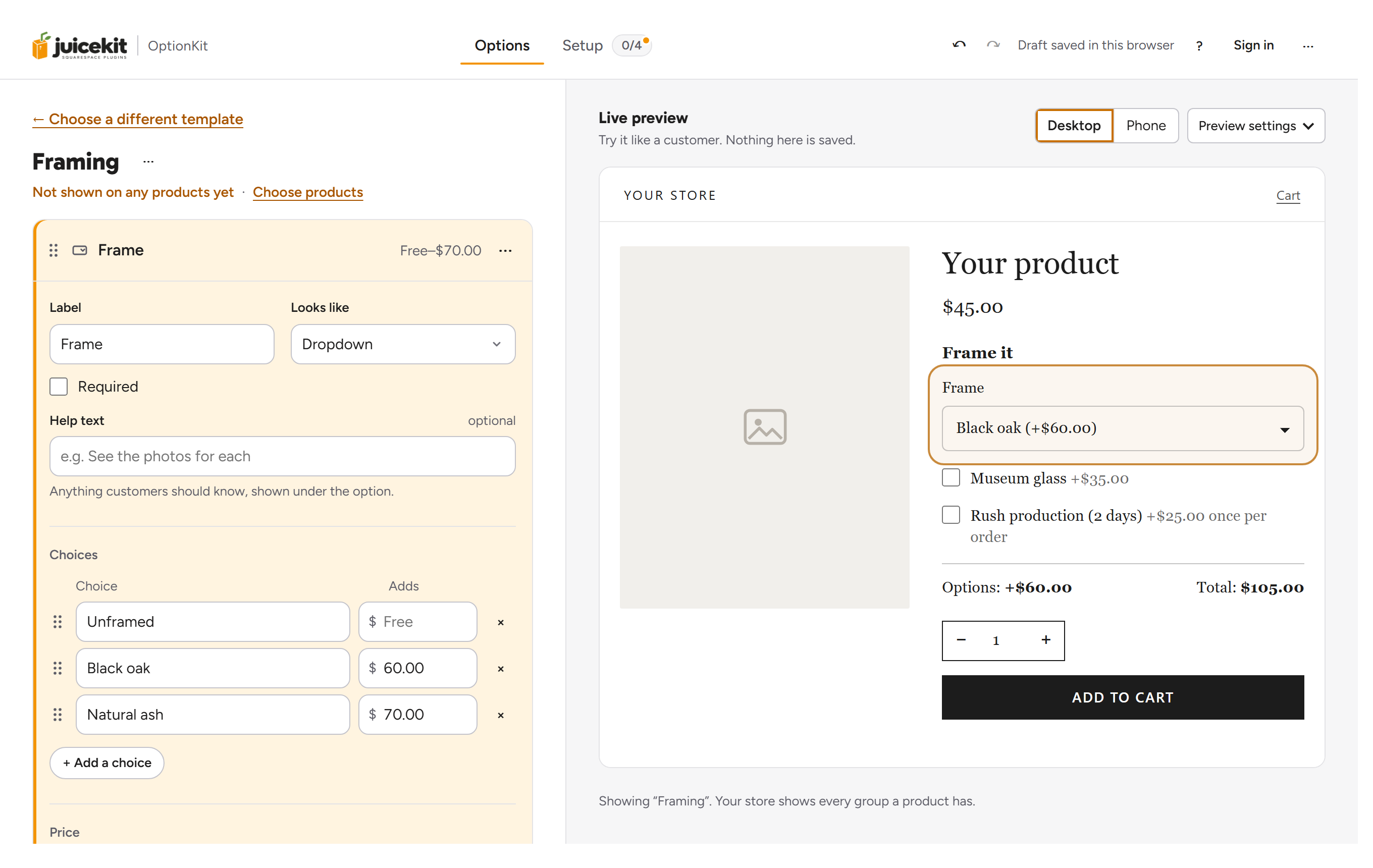
Build your options
Start from a template, like Engraving or Custom cake, or from blank. You see every option the way customers will while you build.
Connect your store
Paste your site code into Squarespace once and choose which products show your options. OptionKit creates the products for your paid options through its Squarespace connection. You can also import them.
Publish
One click puts your options on your store, within about a minute. Every change after that is one click on Update, with nothing to paste again.
Pricing and what you need
Build and test on your squarespace.com address for free, for as long as you like. On your own domain the first 14 days are free, with no card. After that it’s one subscription per store. No per-order fees, no limits on products or options. One $15 engraving pays for the month.
$0
On your site’s squarespace.com address, for as long as you like.
Start building- Every feature, every template
- Build, preview and test your options
- No card needed
$12 / month
per store, billed monthly
$10 / month
per store, billed $120 a year 2 months free
14-day free trial, no card needed. Cancel anytime.
Building and testing on your squarespace.com address is free. The trial starts on your own domain. Test orders need a Squarespace plan with checkout.
Subscribe anytime from the builder.
- Unlimited products, options and orders
- One-click store updates, undo anytime
- OptionKit updates itself automatically
- Email support
- 14-day money-back guarantee on your first payment
When the trial ends, you have 14 more days to subscribe. After that OptionKit stops on your store until you do.
Everything in OptionKit, plus Live preview: customers will see their words on your product photo, in the font they pick, before they buy.
We’re building it now. Leave your email and we’ll tell you when it’s ready.
Prices in US dollars. Payments are handled by Paddle, our reseller. Tax is added at checkout where it applies. How billing works · Details in the Terms.
What you need
- A Squarespace 7.1 site.
- A Squarespace plan with Code Injection: Core, Plus or Advanced, or an older Business or Commerce plan. The Basic plan doesn’t have Code Injection.
- To take orders, a Squarespace plan with checkout, as for any store. You can build and test on a trial site.
- Skip cart page off in Squarespace, which is its usual setting. The builder’s Check my store tells you if it’s on.
Questions
Does it work with my Squarespace template?
OptionKit works on Squarespace 7.1 product pages and uses your theme’s fonts and colors, so it fits any 7.1 template. On a 7.0 site it stays off and tells you why.
Can one Squarespace product have several options?
Yes. Add as many as you need, like engraving, a font and gift wrap on the same product. Each one can have its own price, and you can show an option only when another one is picked.
Do I have to create the products for my paid options myself?
No. Connect with Squarespace in step 3 of the Setup guide, and OptionKit adds a product for each paid option and keeps their prices in step. It never deletes a product or reads your orders or customers. Rather do it yourself? The builder gives you one import file with every paid option, to import in Squarespace’s Products, and then checks your store for each one.
What about inventory and discounts?
Your main product keeps one stock count, whatever options are chosen. Discount codes, taxes and shipping are Squarespace’s, as always. The products for your paid options are set to unlimited stock with no shipping weight.
Can customers upload a photo?
Yes. Add a File upload option, and customers can upload a photo, a logo or a design file with their order. You choose which file types they can send. Files are kept on JuiceKit’s own storage and deleted 90 days after the item goes in the cart. How file upload works
Can I use it on more than one store?
Yes. Each store has its own setup and its own subscription.
Can an option depend on a Squarespace variant, like size?
Rules look at other OptionKit options, not at Squarespace variants. If a choice needs to depend on size, make the size an OptionKit option too, or use one group of options per product.
Do paid options change my stock or shipping weight?
No. The product for each paid option has unlimited stock and no weight, so it never sells out and adds no weight to shipping. Your own products keep their Squarespace stock, per product or per variant, as before.
Made by a Squarespace design studio
JuiceKit is made by Clementine Design Studio, a small team in the San Francisco Bay Area that designs and builds Squarespace websites for small businesses. Our clients’ shops kept asking for an option with a price, so we built OptionKit rather than send them to Shopify.
Let customers personalize your products, and pay for what they choose.
Building and testing on your squarespace.com address is free.
See it for your business: Engraving · Custom cakes · Flowers · Framing · Monograms